Phantom Forces
Stats & Leaderboards.
Your Phantom Forces stats, tracked every hour. Join players reviewing their rounds, climbing leaderboards, taking on challenges, and sharing their favorite builds.
Today’s XP standings
Loading standings…
Shared loadout
Loading loadouts…
Player achievement
Loading achievements…
Community tier list
Loading tier lists…
Track your progress. Find a build. Join the competition.
01 / FEATURES
Stats, leaderboards, and tools for Phantom Forces
Review recorded rounds, compete in community events, plan your next build, or bring your progress to your stream.
Hourly Stat Tracking
Your kills, deaths, KDR, and EXP update every hour automatically. Just link your Roblox account and we handle the rest.
Leaderboards
Daily, weekly, and monthly XP leaderboards — plus weapon kill leaderboards. Earn leaderboard trophies and set alerts for your target placement or a rival.
Recorded Rounds & Insights
Review recorded matches by map, mode, or account. Find personal records, compare with friends, and explore weekly recaps, sessions, and round goals.
Challenges & Tournaments
Take on personal weapon challenges, join available Community Choice Cup events and operations, or follow community tournaments and stat competitions.
Build Comparison & Unlock Plans
Compare attachment builds at your chosen range and hit location. Save unlock plans and track the kills needed to complete your next loadout.
Creator Tools & Stream Overlays
Approved PFX creators can customize OBS overlays with stats, standings, rounds, and weapon progress, connect Twitch or YouTube, and opt into live discovery.
Weapon Library
Browse every Phantom Forces weapon with damage curves, fire rates, recoil data, and interactive 3D models.
Weapon Tier Lists
Create your own weapon tier lists, share them with friends, and browse lists from other community members.
Loadout Sharing
Build loadouts, share them with your friends, and discover community builds that match your playstyle.
Discord Bot
Check stats, leaderboards, and recorded rounds from Discord. Share best-round cards and receive optional trophy and leaderboard alerts.
Rank Roles
Automatically assign Discord roles based on your players' Phantom Forces rank. Configure thresholds from the dashboard.
Account Aggregation
Link multiple Roblox accounts and see your combined stats across all of them in one unified view.
02 / YOUR DASHBOARD
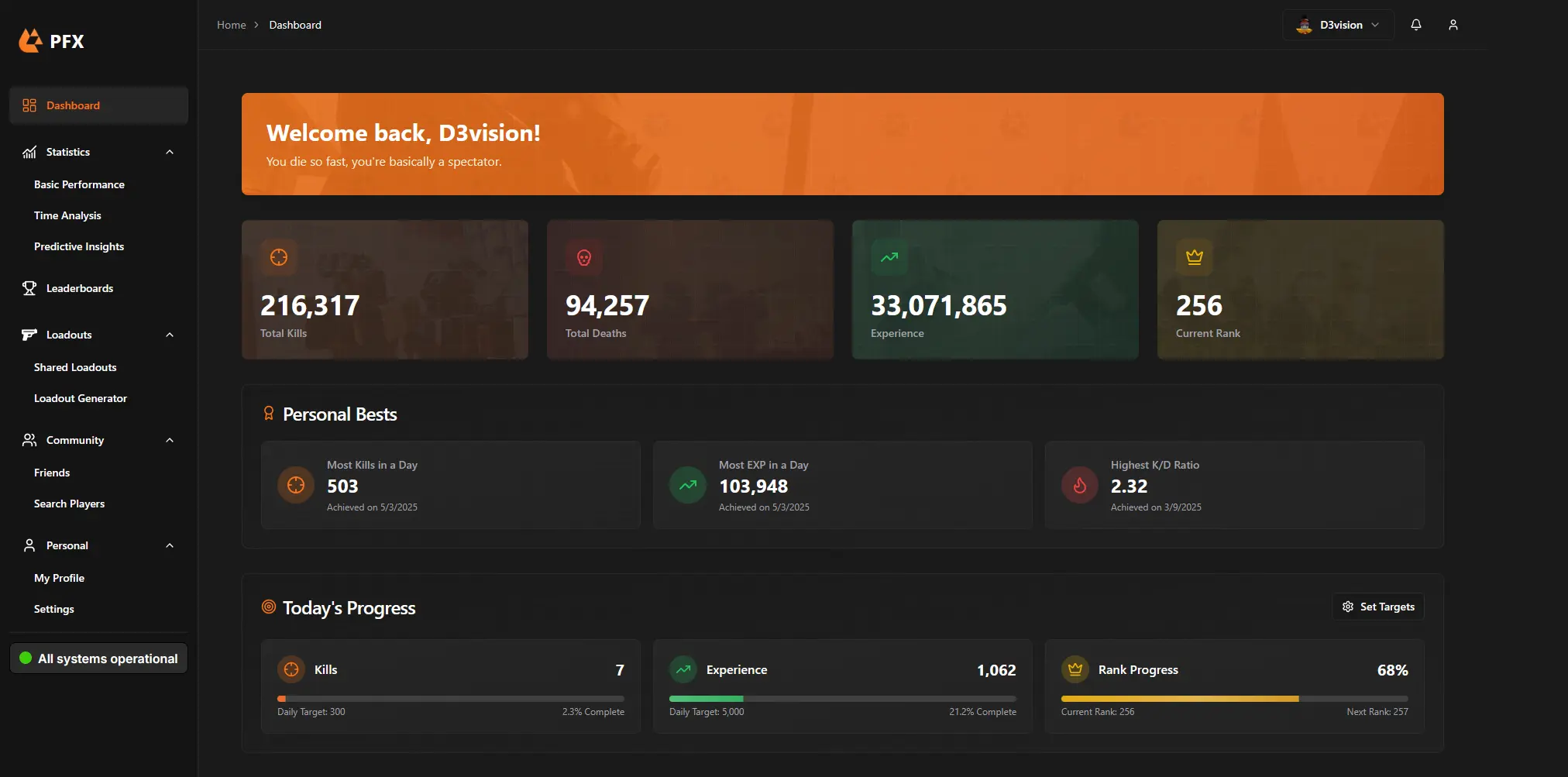
See how your stats change over time.
Your dashboard shows total stats, personal bests, daily progress with custom goals, and an activity timeline — all updated every hour.
Personal bests
Check your best recorded stats.
Daily goals
Track daily progress against your own targets.
Activity history
Follow your activity over time.
03 / GETTING STARTED
Less setup. More play.
Three steps. That's it.
Sign up with Discord
One click. No forms, no email verification.
Link your Roblox account
Verify your Roblox account so we can pull your Phantom Forces data.
You're set
We update your stats every hour, automatically. Just play.
KEEP EXPLORING
More from PFX
Take a look around. No sign-up needed.
FREE TO USE
Start tracking your
Phantom Forces stats.
Your Phantom Forces progress, all in one place.